

Trick To Use Unlimited Flipkart Vouchers In Single Purchase:
1. Open Flipkart App and buy any product. ( Seller must be WS Retail ).
2. Now make a payment using your Gift vouchers.
3. After successful payment, cancel that order which you placed on step two.
4. Once you cancel, you will see two options : a) Return to Flipkart Wallet . b) Refund back to original payment modes.
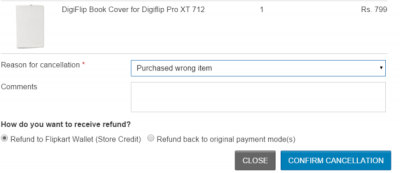
5. Select ” Refund to Flipkart Wallet ” option and click on Confirm Cancellation.
6. Done !! Now open your Flipkart Wallet and see balance
So finally by this trick all your Flipkart Vouchers are converted into Wallet Cash which can be used for any WS Retail product.
Imp. Note : Flipkart Wallet Can only be used to purchase physical goods. Can be used to purchase from WS Retail seller only.
Note : Try this trick at your own risk, we are not responsible for any loss.
Another Trick
Trick To Bypass Flipkart Mobile Verification & Earn Unlimited Gift Vouchers :
1. Start Bluestacks Rooted Version.
2. Download Flipkart apk ver 2.5.4 from Here .
3. Once you download above apk file of Flipkart, right click on it and open with Bluestacks.
4. Now wait for sometimes, let it load.
5. Once it load, open it and sign up new account [ No mobile verification required ].
6. Now minimize Bluestacks & download Flipkart latest version from Here .
7. Once you download new version, right click — open with Bluestacks.
8. Now you can see notification to enter referral code, enter this referral code : yqyauu .
9. Finally open newly created account in PC and purchase this EBook worth Rs.1 : Click To Purchase .
10. Make a payment of Rs.1 using GV or anything you wish.
11. Once you paid, you will receive Gift Voucher in new account as well as old whose referral code you used.
12. After all above steps, open Bluestacks Tweaker then change GUID, Android ID and restart Bluestacks.
Follow above process again and again to loot unlimited Gift Vouchers

This is Shubham Rajpurohit from Rajasthan. A Tech Geek curious about learning new things and sharing it to the World.
ConversionConversion EmoticonEmoticon